<font style="font-size: 12pt;" face='"Times New Roman"'> </font>
<font style="font-size: 14pt; font-weight: bold;" face='"Times New Roman"'>4.2.4 预算调整</font><font style="display: none; font-size: 14pt; font-weight: normal;" face='"Times New Roman"'>{finance_bm_compile_ajustment}</font>
<font style="font-size: 10.5pt;" face='"Times New Roman"'>对审核后的预算进行预算调整。</font>
<font style="font-size: 10.5pt; font-weight: bold;" face='"Times New Roman"' color="#000000">【菜单路径】</font>
<font style="font-size: 10.5pt;" face='"Times New Roman"'>财务/预算管理/预算编制/预算调整</font>
<font style="font-size: 10.5pt; font-weight: bold;" face='"Times New Roman"' color="#000000">【操作界面】</font>
<font style="font-size: 10.5pt;" face='"Times New Roman"' color="#000000">点击预算管理</font><font style="font-size: 10.5pt;" face="宋体" color="#000000">/</font><font style="font-size: 10.5pt;" face='"Times New Roman"' color="#000000">预算编制</font><font style="font-size: 10.5pt;" face="宋体" color="#000000">/</font><font style="font-size: 10.5pt;" face='"Times New Roman"' color="#000000">预算调整,对审核过的预算编制数据进行调整。如图所示</font>
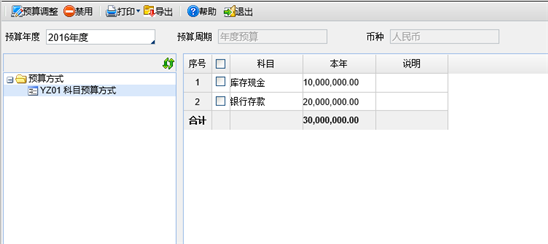
<font style="font-size: 9pt;" face='"Times New Roman"'>图4-13 预算调整界面</font>
<font style="font-size: 10.5pt; font-weight: bold;" face='"Times New Roman"' color="#000000">【栏目说明】</font>
<font style="font-size: 10.5pt; font-weight: bold;" face='"Times New Roman"'>表头字段</font><font style="font-size: 10.5pt; font-weight: bold;" face="宋体">:</font>
- <font style="font-size: 10.5pt;" face='"Times New Roman"'>预算年度:</font><font style="font-size: 10.5pt;" face='"Times New Roman"' color="#000000">显示预算启用年度至当前登录年度</font><font style="font-size: 10.5pt;" face='"Times New Roman"'>。</font>
- <font style="font-size: 10.5pt;" face='"Times New Roman"'>预算周期:显示选择的预算方式的预算周期。</font>
- <font style="font-size: 10.5pt;" face='"Times New Roman"'>币种:显示选择的预算方式的币种。</font>
<font style="font-size: 10.5pt; font-weight: bold;" face='"Times New Roman"'>表体字段</font><font style="font-size: 10.5pt; font-weight: bold;" face="宋体">:</font>
- <font style="font-size: 10.5pt;" face='"Times New Roman"' color="#000000">预算方式树:</font><font style="font-size: 10.5pt;" face='"Times New Roman"'>显示所有已进行过预算审核的预算方式的编码、名称。</font>
- <font style="font-size: 10.5pt;" face='"Times New Roman"'>预算项目列:</font><font style="font-size: 10.5pt;" face='"Times New Roman"' color="#000000">根据选择的预算方式的预算项目定义的内容显示</font><font style="font-size: 10.5pt;" face='"Times New Roman"'>。</font>
- <font style="font-size: 10.5pt;" face='"Times New Roman"' color="#000000">预算数:显示审核通过的预算编制数加上审核通过的预算调整数。</font>
- <font style="font-size: 10.5pt;" face='"Times New Roman"' color="#000000">说明:显示预算编制时录入的说明文字。</font>
<font style="font-size: 10.5pt; font-weight: bold;" face='"Times New Roman"' color="#000000">【操作说明】</font>
- <font style="font-size: 10.5pt;" face='"Times New Roman"' color="#000000">预算禁用</font>
<font style="font-size: 10.5pt;" face='"Times New Roman"'>1)</font><font style="font-style: normal; font-variant-ligatures: normal; font-variant-caps: normal; font-weight: normal; font-stretch: normal; font-size: 7pt; line-height: normal;" face='"Times New Roman"'> </font><font style="font-size: 10.5pt;" face='"Times New Roman"'>在预算调整界面,选择想要禁用的某一预算年度,根据选择的预算年度过滤出相应年度内的预算方式;</font>
<font style="font-size: 10.5pt;" face='"Times New Roman"'>2)</font><font style="font-style: normal; font-variant-ligatures: normal; font-variant-caps: normal; font-weight: normal; font-stretch: normal; font-size: 7pt; line-height: normal;" face='"Times New Roman"'> </font><font style="font-size: 10.5pt;" face='"Times New Roman"' color="#000000">选择要禁用的某一预算方式,</font><font style="font-size: 10.5pt;" face='"Times New Roman"'>系统按照选择的预算方式显示出审核通过预算编制内容;</font><font style="font-size: 10.5pt;" face='"Times New Roman"'> </font>
<font style="font-size: 10.5pt;" face='"Times New Roman"'>3)</font><font style="font-style: normal; font-variant-ligatures: normal; font-variant-caps: normal; font-weight: normal; font-stretch: normal; font-size: 7pt; line-height: normal;" face='"Times New Roman"'> </font><font style="font-size: 10.5pt;" face='"Times New Roman"'>选择需要禁用的记录行,</font><font style="font-size: 10.5pt;" face='"Times New Roman"' color="#000000">点击</font><font style="font-size: 10.5pt;" face='"Times New Roman"'>〖</font><font style="font-size: 10.5pt;" face='"Times New Roman"' color="#000000">禁用</font><font style="font-size: 10.5pt;" face='"Times New Roman"'>〗</font><font style="font-size: 10.5pt;" face='"Times New Roman"' color="#000000">按钮</font><font style="font-size: 10.5pt;" face='"Times New Roman"'>;</font>
<font style="font-size: 10.5pt;" face='"Times New Roman"'>4)</font><font style="font-style: normal; font-variant-ligatures: normal; font-variant-caps: normal; font-weight: normal; font-stretch: normal; font-size: 7pt; line-height: normal;" face='"Times New Roman"'> </font><font style="font-size: 10.5pt;" face='"Times New Roman"'>说明:禁用预算后,也可以随时启用,因此相应的预算执行数任然会保持更新。禁用的预算在预算查询中可以不显示在查询结果中。</font>
- <font style="font-size: 10.5pt; font-weight: bold;" face='"Times New Roman"' color="#000000">预算调整(已有预算项目)</font>
<font style="font-size: 10.5pt;" face='"Times New Roman"'>1) 在预算调整界面,选择想要进行预算调整的某一预算年度,根据选择的预算年度过滤出相应年度内的预算方式;</font>
<font style="font-size: 10.5pt;" face='"Times New Roman"'>2) </font><font style="font-size: 10.5pt;" face='"Times New Roman"' color="#000000">选择要进行预算调整的某一预算方式,</font><font style="font-size: 10.5pt;" face='"Times New Roman"'>系统按照选择的预算方式显示出审核通过预算编制内容;</font>
<font style="font-size: 10.5pt;" face='"Times New Roman"'>3) </font><font style="font-size: 10.5pt;" face='"Times New Roman"'>选择需要进行预算调整的记录行,点击〖预算调整〗按钮</font><font style="font-size: 10.5pt;" face="宋体">,</font><font style="font-size: 10.5pt;" face='"Times New Roman"'>系统显示</font><font style="font-size: 10.5pt;" face="宋体">“</font><font style="font-size: 10.5pt;" face='"Times New Roman"'>调整记录</font><font style="font-size: 10.5pt;" face="宋体">”</font><font style="font-size: 10.5pt;" face='"Times New Roman"'>界面,如图所示;</font>
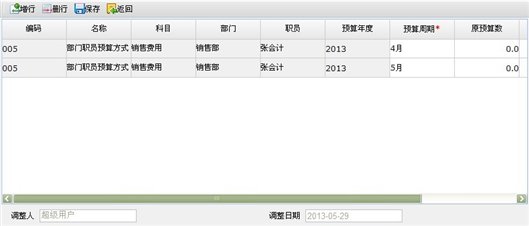
<font style="font-size: 9pt;" face='"Times New Roman"'>图4-14 调整记录界面</font>
<font style="font-size: 10.5pt; font-weight: bold;" face='"Times New Roman"' color="#000000">【栏目说明】</font>
- <font style="font-size: 10.5pt;" face='"Times New Roman"'>编码:</font><font style="font-size: 10.5pt;" face='"Times New Roman"' color="#000000">显示选择的预算方式的编码,不可修改</font><font style="font-size: 10.5pt;" face='"Times New Roman"'>。</font>
- <font style="font-size: 10.5pt;" face='"Times New Roman"'>名称:</font><font style="font-size: 10.5pt;" face='"Times New Roman"' color="#000000">显示选择的预算方式的名称,不可修改</font><font style="font-size: 10.5pt;" face='"Times New Roman"'>。</font>
- <font style="font-size: 10.5pt;" face='"Times New Roman"'>预算项目</font><font style="font-size: 10.5pt;" face='"Times New Roman"' color="#000000">:按选择的预算单元格所涉及的预算项目档案显示,</font><font style="font-size: 10.5pt;" face='"Times New Roman"'>增行时复制显示上一行的预算项目</font><font style="font-size: 10.5pt;" face='"Times New Roman"' color="#000000">。</font>
- <font style="font-size: 10.5pt;" face='"Times New Roman"'>预算年度</font><font style="font-size: 10.5pt; font-weight: bold;" face='"Times New Roman"' color="#000000">:</font><font style="font-size: 10.5pt;" face='"Times New Roman"' color="#000000">显示选择的预算方式的预算年度,不可修改。</font>
- <font style="font-size: 10.5pt;" face='"Times New Roman"' color="#000000">预算周期:显示选择的预算单元格所涉及的预算周期的具体期间,可在下拉列表中选择预算期间,增行时根据上一行的预算期间递增显示。</font>
- <font style="font-size: 10.5pt;" face='"Times New Roman"' color="#000000">原预算数:选择的预算单元格所涉及的预算数,不可修改。</font>
- <font style="font-size: 10.5pt;" face='"Times New Roman"' color="#000000">调整数:录入非</font><font style="font-size: 10.5pt;" face="宋体" color="#000000">0</font><font style="font-size: 10.5pt;" face='"Times New Roman"' color="#000000">数值。</font>
- <font style="font-size: 10.5pt;" face='"Times New Roman"' color="#000000">调整后数:显示</font><font style="font-size: 10.5pt;" face='"Times New Roman"'>原预算数+调整数,</font><font style="font-size: 10.5pt;" face='"Times New Roman"' color="#000000">不能修改,结果必须为大于或等于</font><font style="font-size: 10.5pt;" face="宋体" color="#000000">0</font><font style="font-size: 10.5pt;" face='"Times New Roman"' color="#000000">的数。</font>
- <font style="font-size: 10.5pt;" face='"Times New Roman"' color="#000000">调整人:显示调整人用户名,不可修改。</font>
- <font style="font-size: 10.5pt;" face='"Times New Roman"' color="#000000">调整日期:显示调整日期,不可修改。</font>
<font style="font-size: 10.5pt;" face='"Times New Roman"'>4)</font><font style="font-style: normal; font-variant-ligatures: normal; font-variant-caps: normal; font-weight: normal; font-stretch: normal; font-size: 7pt; line-height: normal;" face='"Times New Roman"'> </font><font style="font-size: 10.5pt;" face='"Times New Roman"'>在调整记录界面,录入调整数后,点击〖保存〗按钮,调整数据被保存,系统返回预算调整界面。</font>
- <font style="font-size: 10.5pt; font-weight: bold;" face='"Times New Roman"' color="#000000">预算调整(新增预算项目)</font>
<font style="font-size: 10.5pt;" face='"Times New Roman"'>1)</font><font style="font-style: normal; font-variant-ligatures: normal; font-variant-caps: normal; font-weight: normal; font-stretch: normal; font-size: 7pt; line-height: normal;" face='"Times New Roman"'> </font><font style="font-size: 10.5pt;" face='"Times New Roman"'>预算调整界面,选择想要进行预算项目新增的某一预算年度,根据选择的预算年度过滤出相应年度内的预算方式;</font>
<font style="font-size: 10.5pt;" face='"Times New Roman"'>2)</font><font style="font-style: normal; font-variant-ligatures: normal; font-variant-caps: normal; font-weight: normal; font-stretch: normal; font-size: 7pt; line-height: normal;" face='"Times New Roman"'> </font><font style="font-size: 10.5pt;" face='"Times New Roman"' color="#000000">选择要进行预算项目新增的某一预算方式,</font><font style="font-size: 10.5pt;" face='"Times New Roman"'>点击</font><font style="font-size: 10.5pt;" face='"Times New Roman"'>〖预算调整〗按钮</font><font style="font-size: 10.5pt;" face="宋体">,</font><font style="font-size: 10.5pt;" face='"Times New Roman"'>系统显示</font><font style="font-size: 10.5pt;" face="宋体">“</font><font style="font-size: 10.5pt;" face='"Times New Roman"'>调整记录</font><font style="font-size: 10.5pt;" face="宋体">”</font><font style="font-size: 10.5pt;" face='"Times New Roman"'>界面,如图所示:</font>
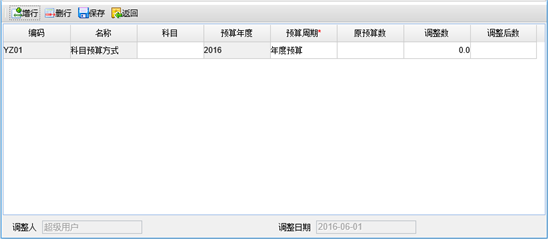
- <font style="font-size: 10.5pt;" face='"Times New Roman"'>编码:</font><font style="font-size: 10.5pt;" face='"Times New Roman"' color="#000000">显示选择的预算方式的编码,不可修改</font><font style="font-size: 10.5pt;" face='"Times New Roman"'>。</font>
- <font style="font-size: 10.5pt;" face='"Times New Roman"'>名称:</font><font style="font-size: 10.5pt;" face='"Times New Roman"' color="#000000">显示选择的预算方式的名称,不可修改</font><font style="font-size: 10.5pt;" face='"Times New Roman"'>。</font>
- <font style="font-size: 10.5pt;" face='"Times New Roman"'>预算项目</font><font style="font-size: 10.5pt;" face='"Times New Roman"' color="#000000">:录入新的或已有的预算项目,当录入已有的预算项目时,功能同预算调整(已有预算项目)</font>
- <font style="font-size: 10.5pt;" face='"Times New Roman"'>预算年度</font><font style="font-size: 10.5pt; font-weight: bold;" face='"Times New Roman"' color="#000000">:</font><font style="font-size: 10.5pt;" face='"Times New Roman"' color="#000000">显示选择的预算方式的预算年度,不可修改。</font>
- <font style="font-size: 10.5pt;" face='"Times New Roman"' color="#000000">预算周期:显示选择的预算单元格所涉及的预算周期的具体期间,可在下拉列表中选择预算期间,增行时根据上一行的预算期间递增显示。</font>
- <font style="font-size: 10.5pt;" face='"Times New Roman"' color="#000000">原预算数:选择的预算单元格所涉及的预算数,不可修改。</font>
- <font style="font-size: 10.5pt;" face='"Times New Roman"' color="#000000">调整数:录入非</font><font style="font-size: 10.5pt;" face="宋体" color="#000000">0</font><font style="font-size: 10.5pt;" face='"Times New Roman"' color="#000000">数值。</font>
- <font style="font-size: 10.5pt;" face='"Times New Roman"' color="#000000">调整后数:显示</font><font style="font-size: 10.5pt;" face='"Times New Roman"'>原预算数+调整数,</font><font style="font-size: 10.5pt;" face='"Times New Roman"' color="#000000">不能修改,结果必须为大于或等于</font><font style="font-size: 10.5pt;" face="宋体" color="#000000">0</font><font style="font-size: 10.5pt;" face='"Times New Roman"' color="#000000">的数。</font>
- <font style="font-size: 10.5pt;" face='"Times New Roman"' color="#000000">调整人:显示调整人用户名,不可修改。</font>
- <font style="font-size: 10.5pt;" face='"Times New Roman"' color="#000000">调整日期:显示调整日期,不可修改。</font>
<font style="font-size: 10.5pt;" face='"Times New Roman"'>3)</font><font style="font-style: normal; font-variant-ligatures: normal; font-variant-caps: normal; font-weight: normal; font-stretch: normal; font-size: 7pt; line-height: normal;" face='"Times New Roman"'> </font><font style="font-size: 10.5pt;" face='"Times New Roman"'>录入新预算项目及调整数,点击</font><font style="font-size: 10.5pt;" face='"Times New Roman"'>〖保存〗按钮,调整数据被保存,系统返回预算调整界面。</font><font style="font-size: 10.5pt;" face='"Times New Roman"'>预算</font><font style="font-size: 10.5pt;" face='"Times New Roman"'>编制</font><font style="font-size: 10.5pt;" face='"Times New Roman"'>、</font><font style="font-size: 10.5pt;" face='"Times New Roman"'>预算审核</font><font style="font-size: 10.5pt;" face='"Times New Roman"'>、预算调整</font><font style="font-size: 10.5pt;" face='"Times New Roman"'>中将新增该项目0</font><font style="font-size: 10.5pt;" face='"Times New Roman"'>预算数</font><font style="font-size: 10.5pt;" face='"Times New Roman"'>的记录,</font><font style="font-size: 10.5pt;" face='"Times New Roman"'>说明中显示:预算调整新增。</font>
<font style="font-size: 10.5pt;" face='"Times New Roman"'> </font>