<font style="font-size: 12pt;" face='"Times New Roman"'> </font>
<font style="font-size: 14pt;" face='"Times New Roman"'>5</font><font style="font-size: 14pt;" face='"Times New Roman"'>.</font><font style="font-size: 14pt;" face='"Times New Roman"'>1</font><font style="font-size: 14pt;" face='"Times New Roman"'>.</font><font style="font-size: 14pt;" face='"Times New Roman"'>1 </font><font style="font-size: 14pt;" face="黑体">销售专用</font><font style="font-size: 14pt;" face='"Times New Roman"'>/</font><font style="font-size: 14pt;" face="黑体">普通发票</font>
<font style="font-size: 10pt;" face="宋体">销售发票是企业给客户开具的增值税专用发票、普通发票等原始销售票据。销售发票管理模块主要功能是发票的开出、修改、查询、复核、作废、现结,以及与税控系统的集成等。</font>
<font style="font-size: 10pt;" face="宋体">销售发票分蓝字单据和红字单据,红字单据表示退货。</font>
<font style="font-size: 10pt; font-weight: bold;" face="宋体">【菜单路径】</font>
<font style="font-size: 10pt;" face="宋体">功能导航</font><font style="font-size: 10pt;" face='"Times New Roman"'>/</font><font style="font-size: 10pt;" face="宋体">财务</font><font style="font-size: 10pt;" face='"Times New Roman"'>/</font><font style="font-size: 10pt;" face="宋体">应收管理</font><font style="font-size: 10pt;" face='"Times New Roman"'>/</font><font style="font-size: 10pt;" face="宋体">发票</font><font style="font-size: 10pt;" face='"Times New Roman"'>/</font><font style="font-size: 10pt;" face="宋体">(专用发票</font><font style="font-size: 10pt;" face='"Times New Roman"'>/</font><font style="font-size: 10pt;" face="宋体">普通发票)</font>
<font style="font-size: 10pt;" face="宋体">单据通用操作参见</font><font style="font-size: 10.5pt; text-decoration: underline;" face="宋体" color="#0000ff">《3.1单据》</font>
<font style="font-size: 10pt; font-weight: bold;" face="宋体">【业务流程】</font>
<font style="font-size: 10pt; font-weight: bold;" face="宋体">销售发票来源:</font><font style="font-size: 10pt;" face="宋体">根据业务流程设置,销售发票可手工录制,可由销售订单、销售发货单、销售出库单(包括期初)、委托代销结算单、销售零售单生单。</font>
<font style="font-size: 10pt; font-weight: bold;" face="宋体">销售发票去向:</font><font style="font-size: 10pt;" face="宋体">根据业务流程设置,销售发票可生成销售出库单、销售发货单,蓝字的销售发票可生成红字的销售发票。与应收管理集成使用时,收款单可参照销售发票生单;与总账系统集成使用时,销售发票可生成凭证。</font>
<font style="font-size: 10pt; font-weight: bold;" face="宋体">【部分数据项说明】</font>
<font style="font-size: 10pt; font-weight: bold;" face="宋体">栏目名称</font> | <font style="font-size: 10pt; font-weight: bold;" face="宋体">栏目说明</font> | |
<font style="font-size: 10pt; font-weight: bold;" face="宋体">表</font><font style="font-size: 10pt; font-weight: bold;" face="宋体">头主要</font><font style="font-size: 10pt; font-weight: bold;" face="宋体">栏目</font> | ||
<font style="font-size: 10.5pt;" face="宋体">业务类型</font> | <font style="font-size: 10.5pt;" face="宋体">下</font><font style="font-size: 10.5pt;" face="宋体">拉选择</font><font style="font-size: 10.5pt;" face="宋体">,选项有:普通销售(默认)/分期收款/委托代销/零售。</font> <font style="font-size: 10.5pt;" face="宋体">如果是期</font><font style="font-size: 10.5pt;" face="宋体">初销售</font><font style="font-size: 10.5pt;" face="宋体">发票,只能是“普通销售”。</font> <font style="font-size: 10.5pt;" face="宋体">如果未启用销售系统,对应选项只能是“普通销售”。</font><font style="font-size: 10.5pt;" face="宋体">参照生单的</font><font style="font-size: 10.5pt;" face="宋体">,业务类型取上游单据的业务类型,不可修改。</font> | |
<font style="font-size: 10.5pt;" face="宋体">业务流程</font> | <font style="font-size: 10.5pt;" face="宋体">参照录入,参照对应业务类型下的未禁用的销售业务流程,且需满足一定的条件。</font> <font style="font-size: 10.5pt;" face="宋体">参照生单的</font><font style="font-size: 10.5pt;" face="宋体">,业务流程取上游单据的业务流程,不可修改。</font> <font style="font-size: 10.5pt;" face="宋体">注:业务流程的选择会对后续流程有很大影响,录入时需按实际业务需要进行选择。</font> | |
<font style="font-size: 10.5pt;" face="宋体">退补标志</font> | <font style="font-size: 10.5pt;" face="宋体">红字发票,才会在表</font><font style="font-size: 10.5pt;" face="宋体">头显示</font><font style="font-size: 10.5pt;" face="宋体">“退补标志”,勾选,表示退货需再</font><font style="font-size: 10.5pt;" face="宋体">补发此</font><font style="font-size: 10.5pt;" face="宋体">部分货物;不勾选,表示退货不需再补发。</font> <font style="font-size: 10.5pt;" face="宋体">注:只有直接来源于非源头蓝字单据的红字单据此标识才可编辑。</font> | |
<font style="font-size: 10.5pt; font-weight: bold;" face="宋体">表体主要栏目</font> | ||
<font style="font-size: 10.5pt;" face="宋体">物品编码</font> | <font style="font-size: 10.5pt;" face="宋体">参照或手工录入,只能录入非禁用的物品。录入、修改物品,且客户非空时,需触发重新取价,并自动匹配客户物品编码。</font> | |
<font style="font-size: 10pt;" face="宋体" color="#000000">客户物品编码</font> |
| |
<font style="font-size: 10pt;" face="宋体" color="#000000">单位</font> |
| |
<font style="font-size: 10pt;" face="宋体" color="#000000">销售计价单位取法</font> | <font size="2">从物品档案中的“销售计价单位取法”带入,浮动换算率的物品可修改计价单位的取法。</font> | |
<font style="font-size: 10pt;" face="宋体" color="#000000">计价单位</font> |
| |
<font style="font-size: 10pt;" face="宋体" color="#000000">计价数量</font> | <font style="font-size: 10pt;" face="宋体" color="#000000">根据录入的计量单位数量即单据表体上</font><font style="font-size: 10pt;" face='"Times New Roman"' color="#000000">“</font><font style="font-size: 10pt;" face="宋体" color="#000000">数量</font><font style="font-size: 10pt;" face='"Times New Roman"' color="#000000">”</font><font style="font-size: 10pt;" face="宋体" color="#000000">及计价单位与计量单位的换算率计算。</font> | |
<font style="font-size: 10pt;" face="宋体" color="#000000">主计量单位数量</font> | <font style="font-size: 10pt;" face="宋体" color="#000000">根据录入的计量单位数量即单据表体上</font><font style="font-size: 10pt;" face='"Times New Roman"' color="#000000">“</font><font style="font-size: 10pt;" face="宋体" color="#000000">数量</font><font style="font-size: 10pt;" face='"Times New Roman"' color="#000000">”</font><font style="font-size: 10pt;" face="宋体" color="#000000">及主单位与计量单位的换算率计算。</font> | |
<font style="font-size: 10pt;" face="宋体" color="#000000">换算率</font> |
<font style="font-size: 10pt;" face="宋体">修改“换算率”后联动“换算率2”。</font> | |
<font style="font-size: 10pt;" face="宋体" color="#000000">报价、单价、金额、</font><font style="font-size: 10pt;" face="宋体" color="#000000">价税合计、税额、含</font><font style="font-size: 10pt;" face="宋体" color="#000000">税单价</font> | <font style="font-size: 10pt;" face="宋体" color="#000000">与</font><font style="font-size: 10pt;" face='"Times New Roman"' color="#000000">“</font><font style="font-size: 10pt;" face="宋体" color="#000000">销售报价取得方式</font><font style="font-size: 10pt;" face='"Times New Roman"' color="#000000">”</font><font style="font-size: 10pt;" face="宋体" color="#000000">、</font><font style="font-size: 10pt;" face='"Times New Roman"' color="#000000">“</font><font style="font-size: 10pt;" face="宋体" color="#000000">销售单据录入以含税价为准、无税价为准</font><font style="font-size: 10pt;" face='"Times New Roman"' color="#000000">”</font><font style="font-size: 10pt;" face="宋体" color="#000000">等参数设置有关,具体换算遵循</font><font style="font-size: 10pt;" face="宋体" color="#ff0000">《销售价格金额计算规则》。</font> | |
<font style="font-size: 10pt;" face="宋体" color="#000000">成本单价</font><font style="font-size: 10pt;" face='"Times New Roman"' color="#000000">/</font><font style="font-size: 10pt;" face="宋体" color="#000000">成本金额</font> | <font style="font-size: 10pt;" face="宋体" color="#000000">根据所选择的业务流程,判定成本单价、成本金额是否可编辑。可编辑时,录入物品时,才会根据参数设置中设计的单据成本取值方式进行自动取值。如果不可编辑,所选择的业务流程成本核算依据为销售发票时,当单据在存货核算中记账后,回</font><font style="font-size: 10pt;" face="宋体" color="#000000">写成本</font><font style="font-size: 10pt;" face="宋体" color="#000000">单价、成本金额。</font> | |
<font style="font-size: 10pt;" face="宋体" color="#000000">税率</font> |
| |
<font style="font-size: 10pt;" face="宋体" color="#000000">最低限价</font> | <font style="font-size: 10pt;" face="宋体" color="#000000">取物品档案上的</font><font style="font-size: 10pt;" face='"Times New Roman"' color="#000000">[</font><font style="font-size: 10pt;" face="宋体" color="#000000">最低售价</font><font style="font-size: 10pt;" face='"Times New Roman"' color="#000000">]</font><font style="font-size: 10pt;" face="宋体" color="#000000">,并换算成计价单位单价。</font> | |
<font style="font-size: 10pt;" face="宋体" color="#000000">最高限价</font> | <font style="font-size: 10pt;" face="宋体" color="#000000">取物品档案上的</font><font style="font-size: 10pt;" face='"Times New Roman"' color="#000000">[</font><font style="font-size: 10pt;" face="宋体" color="#000000">最高售价</font><font style="font-size: 10pt;" face='"Times New Roman"' color="#000000">]</font><font style="font-size: 10pt;" face="宋体" color="#000000">,并换算成计价单位单价。</font> | |
<font style="font-size: 10pt;" face="宋体" color="#000000">成本限价</font> | <font style="font-size: 10pt;" face="宋体" color="#000000">根据参数</font><font style="font-size: 10pt;" face='"Times New Roman"' color="#000000">“</font><font style="font-size: 10pt;" face="宋体" color="#000000">成本价取值方法</font><font style="font-size: 10pt;" face='"Times New Roman"' color="#000000">”</font><font style="font-size: 10pt;" face="宋体" color="#000000">取得相应的成本价。</font> | |
<font style="font-size: 10pt;" face="宋体" color="#000000">退货数量</font> | <font style="font-size: 10pt;" face="宋体" color="#000000">由来源于蓝字销售发票表头</font><font style="font-size: 10pt;" face='"Times New Roman"' color="#000000">[</font><font style="font-size: 10pt;" face="宋体" color="#000000">退补</font><font style="font-size: 10pt;" face='"Times New Roman"' color="#000000">]</font><font style="font-size: 10pt;" face="宋体" color="#000000">=</font><font style="font-size: 10pt;" face='"Times New Roman"' color="#000000">“</font><font style="font-size: 10pt;" face="宋体" color="#000000">否</font><font style="font-size: 10pt;" face='"Times New Roman"' color="#000000">”</font><font style="font-size: 10pt;" face="宋体" color="#000000">的红字销售发票上的主计量单位数量反填。</font><font style="font-size: 10pt;" face="宋体" color="#000000"> </font> | |
<font style="font-size: 10pt;" face="宋体" color="#000000">退货金额</font> | <font style="font-size: 10pt;" face="宋体" color="#000000">由来源于蓝字销售发票表头</font><font style="font-size: 10pt;" face='"Times New Roman"' color="#000000">[</font><font style="font-size: 10pt;" face="宋体" color="#000000">退补</font><font style="font-size: 10pt;" face='"Times New Roman"' color="#000000">]</font><font style="font-size: 10pt;" face="宋体" color="#000000">=</font><font style="font-size: 10pt;" face='"Times New Roman"' color="#000000">“</font><font style="font-size: 10pt;" face="宋体" color="#000000">否</font><font style="font-size: 10pt;" face='"Times New Roman"' color="#000000">”</font><font style="font-size: 10pt;" face="宋体" color="#000000">的红字销售发票上的原币价税合计反填,</font><font style="font-size: 10pt;" face="宋体" color="#000000"> </font> | |
<font style="font-size: 10pt;" face="宋体" color="#000000">退补数量</font> | <font style="font-size: 10pt;" face="宋体" color="#000000">由来源于蓝字销售发票表头[退补]=“是”的红字销售发票上的主计量单位数量反填。</font> | |
<font style="font-size: 10pt;" face="宋体" color="#000000">退补金额</font> | <font style="font-size: 10pt;" face="宋体" color="#000000">由来源于蓝字销售发票表头[退补]=“是”的红字销售发票上原币价税合计反填。</font><font style="font-size: 10pt;" face="宋体" color="#000000"> </font> | |
<font style="font-size: 10pt;" face="宋体" color="#000000">现结金额</font> | <font style="font-size: 10pt;" face="宋体" color="#000000">来源零售单,则带入来源记录对应值。</font> <font style="font-size: 10pt;" face="宋体" color="#000000">来源单据不是零售单或手工单据,则销售发票</font><font style="font-size: 10pt;" face="宋体" color="#000000">进行现结后</font><font style="font-size: 10pt;" face="宋体" color="#000000">,自动计算。</font> | |
<font style="font-size: 10pt;" face="宋体" color="#000000">累计收款金额</font> | <font style="font-size: 10pt;" face="宋体" color="#000000">=</font><font style="font-size: 10pt;" face="宋体">发票核销金额+</font><font style="font-size: 10pt;" face="宋体">现结金</font> | |
<font style="font-size: 10pt;" face="宋体" color="#000000">抹零金额</font> | <font style="font-size: 10pt;" face="宋体" color="#000000">由零售单带入对应字段值。</font> | |
<font style="font-size: 10pt;" face="宋体" color="#000000">税控开票已开具金额</font> | <font style="font-size: 10pt;" face="宋体" color="#000000">税控发票开具时回写。</font> | |
<font style="font-size: 10pt; font-weight: bold;" face="宋体">【单据操作】</font>
- <font style="font-size: 10pt;" face="宋体">生单:即选择单据拉式生单。根据业务流程配置,蓝字销售发票可选择销售订单、销售发货单、销售出库单(包括期初)、委托代销结算单、销售</font><font style="font-size: 10pt;" face="宋体">零售单拉式</font><font style="font-size: 10pt;" face="宋体">生单;红字销售发票可选择蓝字销售发票、红字销售发货单、红字销售出库单(包括期初)、红字销售零售单、金额为负数的委托代销</font><font style="font-size: 10pt;" face="宋体">结算单拉式</font><font style="font-size: 10pt;" face="宋体">生单。</font>
- <font style="font-size: 10pt;" face="宋体">出单:即推式生成下游单据。根据业务流程配置,销售发票可推式生成销售发货单、销售出库单。</font>
- <font style="font-size: 10pt;" face="宋体">销售发票联查:通过工具栏联查功能,可进行库存查询、客户信用查询、收款查询、凭证查询、上查来源单据、</font><font style="font-size: 10pt;" face="宋体">下查所生成</font><font style="font-size: 10pt;" face="宋体">的下游单据,启用工作流的,还可查询流程日志。</font>
- <font style="font-size: 10pt;" face="宋体">销售发票变更:对已经审核的发票可通过变更功能修改该单据表</font><font style="font-size: 10pt;" face="宋体">头数据</font><font style="font-size: 10pt;" face="宋体">中的</font><font style="font-size: 10pt;" face='"Times New Roman"'>“</font><font style="font-size: 10pt;" face="宋体">销售类型</font><font style="font-size: 10pt;" face='"Times New Roman"'>”</font><font style="font-size: 10pt;" face="宋体">、</font><font style="font-size: 10pt;" face='"Times New Roman"'>“</font><font style="font-size: 10pt;" face="宋体">收货地址电话</font><font style="font-size: 10pt;" face='"Times New Roman"'>”</font><font style="font-size: 10pt;" face="宋体">、</font><font style="font-size: 10pt;" face='"Times New Roman"'>“</font><font style="font-size: 10pt;" face="宋体">收货单位</font><font style="font-size: 10pt;" face='"Times New Roman"'>”</font><font style="font-size: 10pt;" face="宋体">、</font><font style="font-size: 10pt;" face='"Times New Roman"'>“</font><font style="font-size: 10pt;" face="宋体">收货人</font><font style="font-size: 10pt;" face='"Times New Roman"'>”</font><font style="font-size: 10pt;" face="宋体">、</font><font style="font-size: 10pt;" face='"Times New Roman"'>“</font><font style="font-size: 10pt;" face="宋体">收货电话</font><font style="font-size: 10pt;" face='"Times New Roman"'>”</font><font style="font-size: 10pt;" face="宋体">、</font><font style="font-size: 10pt;" face='"Times New Roman"'>“</font><font style="font-size: 10pt;" face="宋体">传真</font><font style="font-size: 10pt;" face='"Times New Roman"'>”</font><font style="font-size: 10pt;" face="宋体">、</font><font style="font-size: 10pt;" face='"Times New Roman"'>“</font><font style="font-size: 10pt;" face="宋体">开票客户</font><font style="font-size: 10pt;" face='"Times New Roman"'>”</font><font style="font-size: 10pt;" face="宋体">、</font><font style="font-size: 10pt;" face='"Times New Roman"'>“</font><font style="font-size: 10pt;" face="宋体">开户银行</font><font style="font-size: 10pt;" face='"Times New Roman"'>”</font><font style="font-size: 10pt;" face="宋体">、</font><font style="font-size: 10pt;" face='"Times New Roman"'>“</font><font style="font-size: 10pt;" face="宋体">银行账号</font><font style="font-size: 10pt;" face='"Times New Roman"'>”</font><font style="font-size: 10pt;" face="宋体">、</font><font style="font-size: 10pt;" face='"Times New Roman"'>“</font><font style="font-size: 10pt;" face="宋体">纳税人登记号</font><font style="font-size: 10pt;" face='"Times New Roman"'>”</font><font style="font-size: 10pt;" face="宋体">、</font><font style="font-size: 10pt;" face='"Times New Roman"'>“</font><font style="font-size: 10pt;" face="宋体">表头自定义项</font><font style="font-size: 10pt;" face='"Times New Roman"'>”</font><font style="font-size: 10pt;" face="宋体">、</font><font style="font-size: 10pt;" face='"Times New Roman"'>“</font><font style="font-size: 10pt;" face="宋体">部门</font><font style="font-size: 10pt;" face='"Times New Roman"'>”</font><font style="font-size: 10pt;" face="宋体">、</font><font style="font-size: 10pt;" face='"Times New Roman"'>“</font><font style="font-size: 10pt;" face="宋体">职员</font><font style="font-size: 10pt;" face='"Times New Roman"'>”</font><font style="font-size: 10pt;" face="宋体">及</font><font style="font-size: 10pt;" face='"Times New Roman"'>“</font><font style="font-size: 10pt;" face="宋体">备注</font><font style="font-size: 10pt;" face='"Times New Roman"'>”</font><font style="font-size: 10pt;" face="宋体">进行变更,对表体内数据中的</font><font style="font-size: 10pt;" face='"Times New Roman"'>“</font><font style="font-size: 10pt;" face="宋体">物品开票名称</font><font style="font-size: 10pt;" face='"Times New Roman"'>”</font><font style="font-size: 10pt;" face="宋体">、</font><font style="font-size: 10pt;" face='"Times New Roman"'>“</font><font style="font-size: 10pt;" face="宋体">开票规格型号</font><font style="font-size: 10pt;" face='"Times New Roman"'>”</font><font style="font-size: 10pt;" face="宋体">、</font><font style="font-size: 10pt;" face='"Times New Roman"'>“</font><font style="font-size: 10pt;" face="宋体">仓库</font><font style="font-size: 10pt;" face='"Times New Roman"'>”</font><font style="font-size: 10pt;" face="宋体">、</font><font style="font-size: 10pt;" face='"Times New Roman"'>“</font><font style="font-size: 10pt;" face="宋体">货位</font><font style="font-size: 10pt;" face='"Times New Roman"'>”“</font><font style="font-size: 10pt;" face="宋体">批次</font><font style="font-size: 10pt;" face='"Times New Roman"'>”</font><font style="font-size: 10pt;" face="宋体">、</font><font style="font-size: 10pt;" face='"Times New Roman"'>“</font><font style="font-size: 10pt;" face="宋体">项目</font><font style="font-size: 10pt;" face='"Times New Roman"'>”</font><font style="font-size: 10pt;" face="宋体">、</font><font style="font-size: 10pt;" face="宋体"> </font><font style="font-size: 10pt;" face='"Times New Roman"'>“</font><font style="font-size: 10pt;" face="宋体">备注</font><font style="font-size: 10pt;" face='"Times New Roman"'>”</font><font style="font-size: 10pt;" face="宋体">、</font><font style="font-size: 10pt;" face='"Times New Roman"'>“</font><font style="font-size: 10pt;" face="宋体">表体自定义项</font><font style="font-size: 10pt;" face='"Times New Roman"'>”</font><font style="font-size: 10pt;" face="宋体">进行变更。变更后可查看变更记录。变更时,〖增行</font><font style="font-size: 10pt;" face="宋体">〗</font><font style="font-size: 10pt;" face="宋体">、〖删行</font><font style="font-size: 10pt;" face="宋体">〗</font><font style="font-size: 10pt;" face="宋体">可用。注:</font><font style="font-size: 10pt;" face="宋体">删</font><font style="font-size: 10pt;" face="宋体">行时,如果所选明细行已发生业务,则不允许</font><font style="font-size: 10pt;" face="宋体">删</font><font style="font-size: 10pt;" face="宋体">行,提示用户</font><font style="font-size: 10pt;" face='"Times New Roman"'>“</font><font style="font-size: 10pt;" face="宋体">此行数据已有后续业务,不能删除。</font><font style="font-size: 10pt;" face='"Times New Roman"'>”</font>
- <font style="font-size: 10pt;" face="宋体">销售发票现结:保存状态的销售发票可在发票单据界面或在发票列表选择一行记录,进行现结。</font>
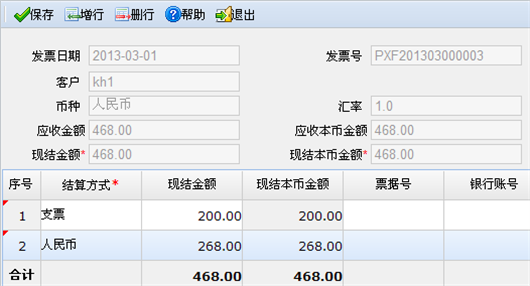
<font style="font-size: 10pt;" face="宋体">发票现结界面</font><font style="font-size: 10pt;" face="宋体">如下图所示。</font>
<font style="font-size: 10pt;" face="宋体">说明:</font>
- <font style="font-size: 10pt;" face="宋体">现结界面</font><font style="font-size: 10pt;" face="宋体">,客户、币种、汇率、应收金额、应收本币金额取自发票的相应的数据项值,不可编辑,应收金额取对应的发票金额,应收本币金额取对应发票的本币金额。</font><font style="font-size: 10pt;" face="宋体">现结金额</font><font style="font-size: 10pt;" face="宋体">=行中的</font><font style="font-size: 10pt;" face="宋体">现结金额</font><font style="font-size: 10pt;" face="宋体">合计、</font><font style="font-size: 10pt;" face="宋体">现结本币</font><font style="font-size: 10pt;" face="宋体">金额=行中</font><font style="font-size: 10pt;" face="宋体">的现结本币</font><font style="font-size: 10pt;" face="宋体">金额合计,不可编辑。</font>
- <font style="font-size: 10pt;" face="宋体">支持多结算方式结算,蓝字发票的</font><font style="font-size: 10pt;" face="宋体">现结金额合计应不能</font><font style="font-size: 10pt;" face="宋体">大于应收金额才可保存成功;红字发票</font><font style="font-size: 10pt;" face="宋体">现结金额</font><font style="font-size: 10pt;" face="宋体">的合计不能小于应收金额才可保存成功。</font>
- <font style="font-size: 10pt;" face="宋体">现结界面</font><font style="font-size: 10pt;" face="宋体">录入完信息,保存成后,会自动生成“收款类型”为</font><font style="font-size: 10pt;" face="宋体">”</font><font style="font-size: 10pt;" face="宋体">现结</font><font style="font-size: 10pt;" face="宋体">”</font><font style="font-size: 10pt;" face="宋体">,状态为“审核通过”的收款单。</font>
- <font style="font-size: 10pt;" face="宋体">现结生成</font><font style="font-size: 10pt;" face="宋体">的付款单不能在付款单上反审核,只能在发票中做</font><font style="font-size: 10pt;" face="宋体">反现结处理</font><font style="font-size: 10pt;" face="宋体">。</font>
- <font style="font-size: 10pt;" face="宋体">销售发票反现结:</font><font style="font-size: 10pt;" face="宋体">发票现结后</font><font style="font-size: 10pt;" face="宋体">,可以反现结。注:</font><font style="font-size: 10pt;" face="宋体">现结生成</font><font style="font-size: 10pt;" face="宋体">的收款单在出纳系统收款后,不可反现结;发票审核后也不可反现结。</font>
- <font style="font-size: 10pt;" face="宋体">税控开具打印、打印销货清单、已开具税控发票作废:参见《财税一体化》手册。</font>
- <font style="font-size: 10pt;" face="宋体">销售发票生成凭证:在销售管理与总账管理集成使用时,销售发票可生成凭证。可通</font><font style="font-size: 10pt;" face="宋体">过单据界面〖操作〗按钮下的〖生成凭证</font><font style="font-size: 10pt;" face="宋体">〗</font><font style="font-size: 10pt;" face="宋体">、销售发票列表工具栏的〖凭证〗生成凭证。与应收管理集成使用时,也可通过</font><font style="font-size: 10pt;" face='"Times New Roman"'>“</font><font style="font-size: 10pt;" face="宋体">应收管理</font><font style="font-size: 10pt;" face='"Times New Roman"'>/</font><font style="font-size: 10pt;" face="宋体">凭证</font><font style="font-size: 10pt;" face='"Times New Roman"'>/</font><font style="font-size: 10pt;" face="宋体">生成凭证</font><font style="font-size: 10pt;" face='"Times New Roman"'>”</font><font style="font-size: 10pt;" face="宋体">处,选择销售发票生成凭证。</font>
<font style="font-size: 10pt; font-weight: bold;" face="宋体">【业务控制】</font>
- <font style="font-size: 10pt;" face="宋体">暂存状态的发票不可现结、审核,可修改、删除。</font>
- <font style="font-size: 10pt;" face="宋体">销售零售单生成的发票自动</font><font style="font-size: 10pt;" face="宋体">打上现结标识</font><font style="font-size: 10pt;" face="宋体">,不可反现结,不可生成收款单。销售零售单生成的发票可修改、删除。</font>
- <font style="font-size: 10pt;" face="宋体">不可删除的销售发票有:系统自动生成的销售发票不可删除,反审核其上游单据,会同时删除自动生成的发票;已现结、已审核、已记账的销售发票不可删除。</font>
- <font style="font-size: 10pt;" face="宋体">销售发票保存时,会根据销售参数的设置,对发票容差、最低最高售价、成本控价进行校验。</font><font style="font-size: 10pt;" face="宋体"> </font>
- <font style="font-size: 10pt;" face="宋体">在销售管理与应收管理模块同时启用时,从销售管理模块传递到应收管理模块的销售发票只能在销售管理模块做修改、删除操作,应收管理模块只能查看。</font>
<font style="font-size: 10pt;" face='"Times New Roman"'> </font>